ForeverBot Troubleshooting: What the Status Panel Says When the Bot Is Stuck, Dead or Logged Out
A wow farming bot stuck at a cliff, dead at a graveyard or logged out: how to read ForeverBot's Current status panel and fix the ten common first-night problems.
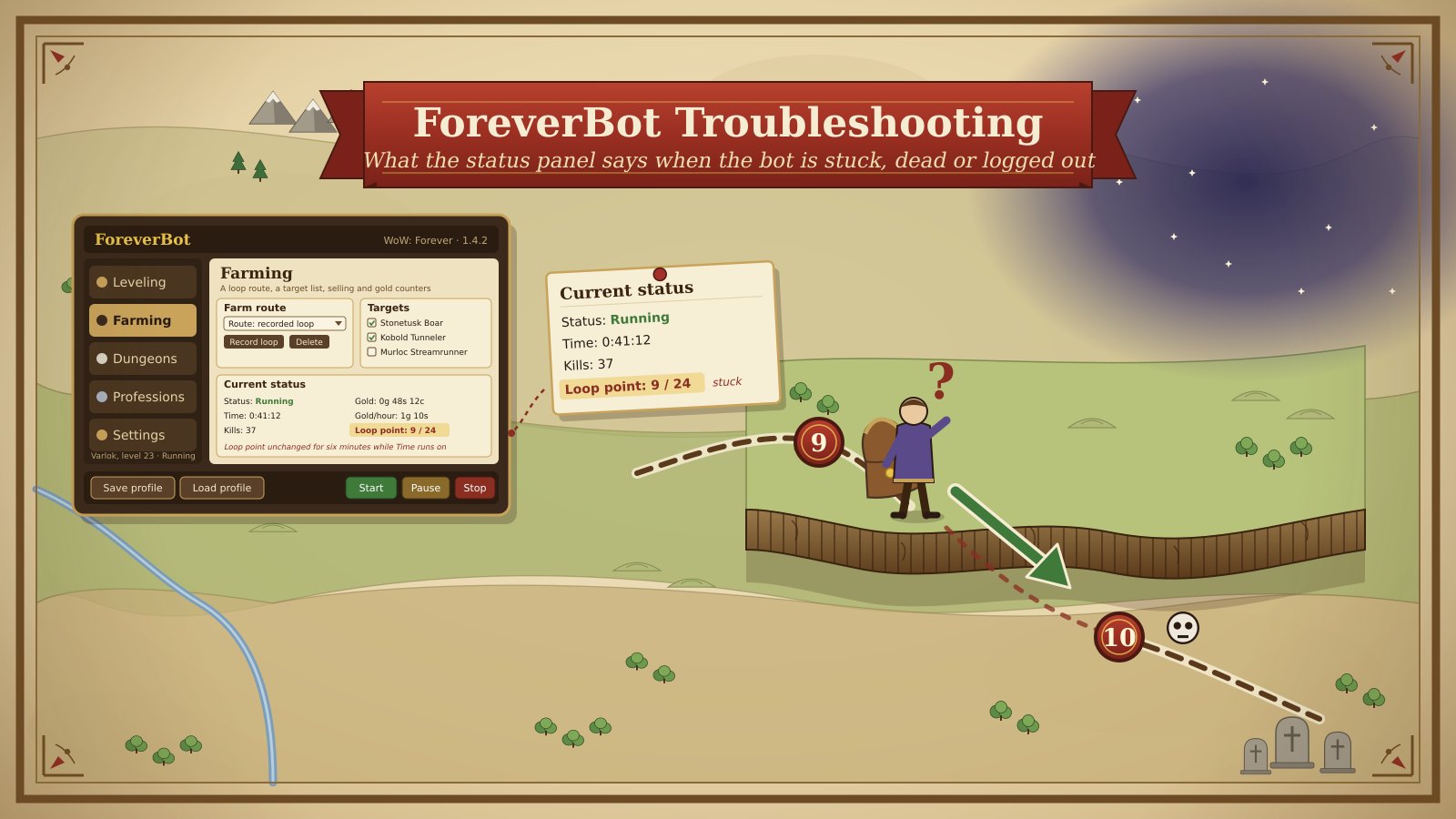
A wow farming bot stuck against a fence looks the same from the chair as one that has crashed, died or disconnected, and the fix is different every time. The Current status panel in ForeverBot tells them apart if you know which line to read: Status, Loop point, the next node and its distance, the next step. This guide is a diagnostic in eight checks, from the status line to the token, with the first-night problems and their fix: Click-to-Move off, keys unbound, an Arrival radius wrong for a mine, a loop recorded on a mount or under water, full bags with no vendor, a dead character, a disconnect, a rejected token and a profile that will not load. It ends with a sensible session, for a character of any level on a vanilla-era realm such as WoW Forever.
Where and what you need
The window and the game side by side. Most stuck cases are a mismatch between the two: the window says Running, the game shows the character standing still. Keep both visible, with the Guide window and Sound cues on, so a pause is heard before it is seen.
The status panel for your section. Each section has its own Current status. Leveling shows Status, Level, Zone, Guide with a step count, XP/hour and Next; Farming shows Status, Time, Kills, Gold, Gold/hour and Loop point; Professions shows Status, Time, Nodes gathered, Next node and yards, and Loop point. The sidebar shows the character's name and level and a state line such as Stopped, leveling.
Three free keys. Target, Interact and Combat do the work in the game; the window only shows the way. Half of all nothing-happens reports are a key bound elsewhere.
A saved profile and the account page. Load profile recovers from almost any wrong setting, and the Bot token panel in the account is where a rejected token is replaced. If neither exists yet, the ForeverBot first run guide is the evening to do first.
Patience for one lap. A character that is slow at a cliff is not stuck until the Loop point has sat on the same number for longer than a lap takes, so watch a whole lap before changing anything.
The route
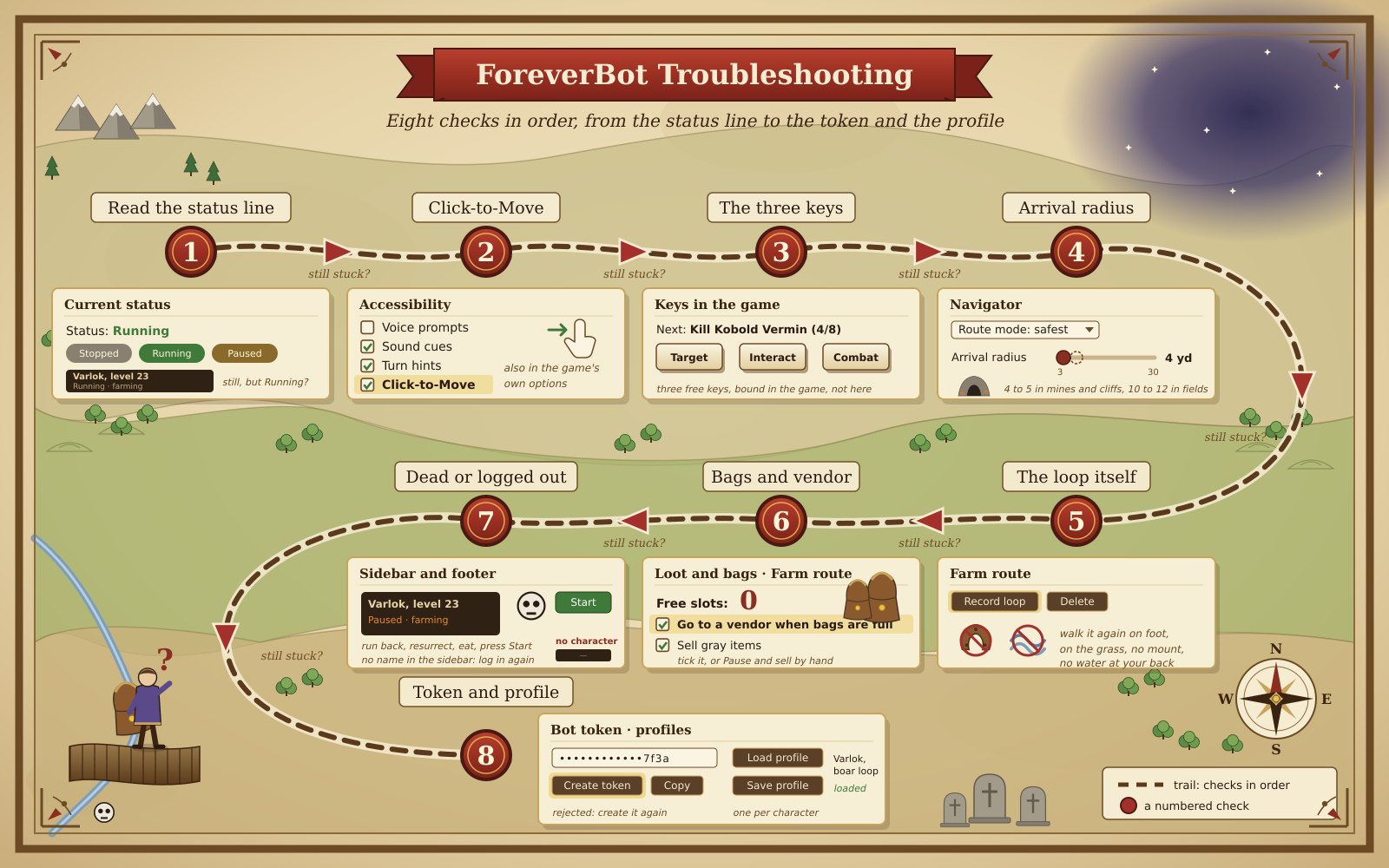
Work through the checks in order; most problems are caught by the third.
- Read the status line. Status says Stopped, Running or Paused, and the sidebar repeats it. Stopped with nothing moving means Start was never pressed, the profile did not load, or the bot stopped itself after a death or a disconnect. Paused means you pressed Pause, or the window paused itself for a vendor trip or a death. Only Running with a still character is a real stuck case, and everything below assumes it.
- Click-to-Move. Open Settings, Accessibility, Click-to-Move. If it is unticked the arrow turns, the Loop point stays on 1 / 24 and the character never takes a step. Tick it, and tick the same option in the game's own interface settings; the window cannot set it for you. It is the first-night problem nine times out of ten.
- The three keys. The arrow points at a mob, Next says Kill Kobold Vermin (4/8) and the count does not move: Target, Interact or Combat is bound to nothing or to something else. Give each one a free key in the game's key bindings and press Start again. Combat on a key you also use for a mount or a trinket is the usual culprit.
- Arrival radius. The character runs to a point, turns, runs back, and the Loop point or the Next node distance never reaches the next number: the point is on a cliff edge, a mine wall or a hillside and the Arrival radius in Navigator is wrong for it. Too wide and it counts as arrived on the wrong level; too narrow and it circles a point it cannot stand on. Set 4 or 5 yards for mines and cliffs, 10 or 12 for open fields, and switch Route mode to safest on a route that hugs a ridge, as the Thorium mining route and the Stranglethorn skinning lap both do.
- The loop itself. If the Loop point jumps two numbers at a time or the character cuts corners into trees, the loop was recorded on a mount and the points are too far apart for walking. If it swims, a point is under water, usually a lake-shore murloc stop. The fix is the same: press Delete in Farm route, press Record loop and walk it again on foot, on the grass, never with the water at your back.
- Bags and vendor. Loop point frozen, Time running, Kills rising and then stopping too: look at Free slots in Loot and bags. At 0 with Go to a vendor when bags are full unticked, the character loots nothing and goes nowhere. Tick it, or press Pause and sell by hand. With it ticked, a frozen Loop point is the vendor walk itself and resumes on its own; the loot and bag settings guide has the full bag arithmetic.
- Dead or logged out. Death sets Status to Paused, the arrow turns to the corpse, and the lap waits: run back, resurrect, eat, press Start, and the loop resumes at the nearest point. If a pull keeps killing you, untick that mob in Targets or record the loop around it; the bot retreats along the route from a fight you abandon but will not win one for you. A disconnect clears the character's name from the sidebar and sets Stopped; log back in, wait for the name to return and press Start, or reopen the window.
- Token and profile. A window that opens with no character and a sign-in error is a token the server has rejected: an expired plan, a token created again later, or a paste with a space in it. Open the account, press Create token in the Bot token panel, press Copy and paste it into the bot. A profile that will not load is almost always saved for a different character or section; open that section, press Load profile, and if the list is empty set the options again and Save profile with the character in the name.
What you get
| Section | What you set up | What the status panel shows |
|---|---|---|
| Leveling | Keys, Click-to-Move, a level range | Status, Level, Zone, Guide, XP/hour, Next |
| Farming | A loop walked on foot, Targets, the vendor option | Status, Time, Kills, Gold, Gold/hour, Loop point |
| Professions | Skills ticked, Remember nodes, Arrival radius for mines | Status, Time, Nodes gathered, Next node and yards, Loop point |
| Dungeons | A dungeon for your level | Dungeon, Levels, Zone, Recommended |
| Settings | Route mode, Arrival radius, Click-to-Move | Nothing to count; it is where most fixes live |
| Sidebar and footer | The token, one profile per character | Name and level, the state line, Start, Pause, Stop |
Time it takes
Checks 1 to 3 take two minutes and solve most first nights. Check 4 is a slider and a lap to confirm, ten to fifteen minutes. Check 5 is a new recording, five to fifteen minutes. Check 6 is a vendor walk, three to twelve minutes. A death at check 7 is a corpse run of two to five minutes plus eating; a disconnect is however long the realm takes. Check 8 is two minutes and a paste.
Budget the first night as two hours of farming plus half an hour of this list, and expect the second night to need almost none of it. Keep notes on which check fixed what; the same loop breaks in the same place, and the Elwynn Forest route breaks at the lake shore most.
Tips
- Watch one whole lap before touching a setting; the Loop point is the clock.
- Tick Click-to-Move in both the window and the game's own interface options.
- Record loops on foot, in daylight, on the grass, with the vendor on the lap.
- Lower Arrival radius for mines and cliffs, raise it for fields, and save a profile per route.
- Keep Sound cues on; the chime when the lap pauses reports a vendor trip or a death first.
- Replace a rejected token rather than retyping it; the new one is shown once, so use the Copy button.
Running it with ForeverBot
Read the Current status panel top to bottom and match the line that looks wrong to a check: Status to check 1, a still character to checks 2 and 3, a frozen Loop point to 4, 5 and 6, a Paused status with a ghost to 7, no character in the sidebar to 7 and 8. Press Pause before changing anything, change one thing, Save profile, and press Start; two changes at once hide which one worked. The checks are the same in every plan; see plans and pricing.
Then decide what a sensible session is and keep to it. Two to four hours with a break every hour is plenty; set the Stop time before you press Start and let the Time counter hold you to it. Pause is for the kettle, Stop is for the night. A window left Running while you sleep is a character in a field with full bags and a corpse run in the morning, and that is the gentle outcome: automation is against the game's terms of service and carries a real risk of losing the character or the account. ForeverBot does not remove that risk, and a short, attended session that you Stop on time is the only sensible way to use it.
FAQ
The Status says Running but the character is standing still. Which check first?
Check 2, Click-to-Move, in Settings, Accessibility and in the game's own options. If it is ticked in both, check 3: press each of Target, Interact and Combat by hand and watch whether the character responds. A still character with both of those correct is nearly always check 4, a point the character thinks it has reached.
The bot stopped after my character died. Does it resurrect me?
No. Death sets Status to Paused and the arrow points to the corpse, but the run back, the resurrection and the eating are yours, and so is unticking the mob that killed you in Targets. Press Start afterwards and the loop resumes from the nearest point. If the same pull kills you twice, record the loop around it.
Is it safe to leave ForeverBot running overnight?
No, and the window is not built for it. Automation is against the game's terms of service and carries a real risk of a ban on any realm; a long unattended session also ends with full bags, a dead character or a disconnect with nobody to press Start. Run two to four hours, take breaks, and Stop at the time you decided on beforehand.
Want the farming done for you? Get the bot